
As online small business owners, it’s easy to blur the lines of what a workday or workweek looks like. Do your clients know when they can reach you or how long it takes for you to respond to their email? Do they text or message you when they need something and expect an immediate response? If you don’t provide structure to your day and worklife, someone else will define these boundaries for you. Between meetings, client needs, business needs, creating content and your personal life, it’s easy to get pulled into a million different directions and lose focus on what truly needs to get done.
Picture the following for a second:
You crack open your laptop to finish up blog post. You notice new emails came through overnight and decide to check those. A chat message comes through Zoom with “just a quick question.” Back to the blog post. While writing, you remember seeing a really interesting article that could tie in with the blog. You open Facebook to find it. You search multiple groups, trying to remember where you saw it and in what context. While searching, you see an interesting post in a group, you read the comments…(45 minutes later) You look through your multiple browsers looking for that blog post draft….
Does this scenario sound familiar?
Meetings, emails and calls can interrupt your flow and when you work from home, it’s even harder to carve out time without falling down a rabbit hole. While women have a reputation for being great at multitasking, science shows that we don’t accomplish as much when we’re focused on two tasks simultaneously instead of one main objective. Time blocking goes beyond a to-do list and requires you to commit to action by outlining when you’ll get things done. It’s a way to manage your time and prioritize your goals. Rather than multitasking, you set aside time to finish big and small tasks one at a time. The benefits of time blocking include getting things done quicker, with fewer distractions, and cranking out your lengthy to-do list means less stress in the long run.
Have I gotten your attention, but still not sure whether time blocking is for you? Pay attention to how long tasks take you now, then commit to time blocking for one month. See if you accomplish tasks quicker. Here at Digitally Evergreen, we gave it a try and a quick summary of the experience is below.
To put a schedule into place and use time blocking effectively, you need to think through what tasks you do regularly and how long they take (free tools like toggl can track how long they take.) You need to be prepared to stick to this schedule. Before finalizing your blocks, be sure you’ve aligned your schedule with client and family obligations.
When you’re ready to give it a shot, grab your notebook, planner or my personal favorite digital platform, Asana, and answer these questions:
- What are your top 3 priorities?
- What are smaller tasks you need to accomplish each day?
- What non-work-related tasks do you need to accomplish regularly?
Here’s an example:
- Plan course content, team meetings, etc.
- Respond to client emails and voicemails, track financials, review marketing analytics, etc.
- gym, book club, date night, vacation, etc.
Let’s block!
Forget the clock and instead, use the dedicated time blocks to focus on the tasks you need to get done. Dedicate at least one hour to the hardest tasks when you’re most productive (usually this will be in the am) and start with the highest priority items first. Time blocks don’t work as well if they’re longer than a few hours. Schedule the rest of your day in shorter blocks with one task per block and order the tasks from high priority to low, based on your energy levels. Set aside 30-minute flextime in case tasks take longer than the time you blocked or for unexpected emergencies. Since most of us aren’t our most productive or creative at the end of the day, schedule your lowest priority tasks then. For example, I schedule my “office hours” when I respond to emails and calls later in the afternoon. I also color code my tasks by high, moderate or low priority and I found that setting a timer helped me ensure I stayed on schedule for certain tasks. In a future post, I’ll show you how I organize my tasks in Asana.
When you’re done, each day of the week will look something like this:
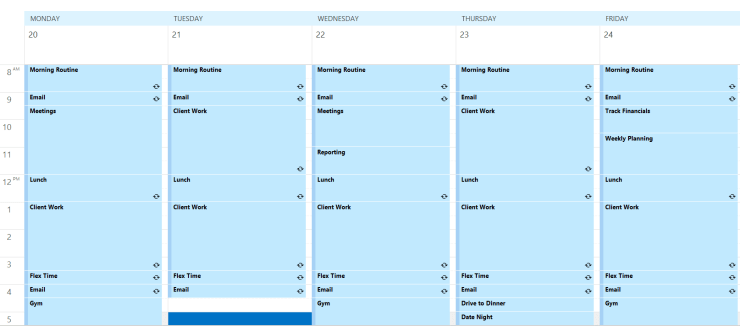
Time blocks allow for advanced planning, so you aren’t scrambling to get things done at the last minute. Set aside one day per year for annual planning, an hour every month for monthly planning and an hour each week for weekly planning. Use this planning time, and ONLY this planning time to create your to-do list.
Don’t be afraid to schedule in time to celebrate your wins and time off. To utilize time blocking to its fullest potential, you need to commit, even if it feels rigid at first. Avoid distractions by putting your phone on silent, close unnecessary browsers, social media and your email.
I tried out time blocking and here is my experience. I knew it’s not for everyone and I was somewhat hesitant. While I’m a lover of planning and task management, time blocking seemed like so much work upfront and who wants to schedule out every detail of their life down to the minute? In the end, my answer was it’s not totally for me, BUT there are aspects of time blocking I’m adopting in my business. I know that sounds like a cop out, but really, employing this scheduling strategy showed me how often I get distracted and even the simplest tasks take me much longer to complete when I leave my email open or get caught up in social media. It also allowed me to set better expectations and boundaries in my business. Clients know that I’m available at certain times and can expect a response within that timeframe. Time blocking also stepped up my planning game in a big way. Setting aside time to regularly plan my week, month and year has allowed me to set bigger goals and break them up into smaller chunks that will allow me to accomplish these milestones. After I finished my month of time blocking, do I plan out every hour of my workday? No. Have I stopped my multi-tasking and mastered the one-task-per-block mindset? Definitely not, but this experience provided a framework that once adopted, can improve your focus throughout the day and increase productivity. Overall, the experience made me more proactive with my time and rather than reacting solely to the needs of my clients or business.
 digitallyevergreen.com